What it does
I wrote unidex as a small OS for a 1.54" e-ink board. It's a home screen, seven built-in apps and an agent you talk to, and two buttons run all of it. You can add more, written by anyone.
Overview
I made it to be carried. Clip it to your keys or your uni lanyard and glance at it between lectures. The screen is e-ink, so it reads in daylight like paper.
The home screen shows one app at a time: its icon, its name, a live line ("In 12 min: Maths", "3 notes", "5pm: Call Sam") and a dot for each app underneath. The top right shows the time and battery level. After 10 seconds without a press (less with Battery saver on) it goes into deep sleep. The screen keeps showing what it last drew, because e-ink needs no power for that.
WiFi stays off until something needs it: sending a voice note, reminder or agent request, or setting the clock.
Timetable
Your next class or event as a card: "IN 42 MIN", "NOW, UNTIL 16:00" or "TOMORROW 09:30" on top, the title in large type, the time and length, the place, and what comes after.
- A steps through the next five items. B opens the full details, including the event's notes.
- Hold B for the rest of today.
- Weekly classes come from a simple timetable file on the SD card.
- Calendar events (Google, Outlook, iCloud): save your calendar's private link in Setup, then Settings > Sync fetches this week's events over WiFi.
- Apple Calendar: a small Mac helper sends the next 7 days of events whenever unidex is plugged in. You can also send a calendar file from the Tools page.
While it's awake, the countdown moves on each minute. Asleep, the screen keeps the last one.
Notes
Hold B and talk, up to three minutes. Let go to stop. Then, over WiFi, it:
- transcribes the recording (OpenAI Whisper, or ElevenLabs Scribe, whose free plan covers about half an hour a month),
- tidies it up with OpenAI or Claude, or leaves it as is: a short title, a one-line summary, a clean rewrite and topics. If you mention a dated plan ("dentist next Friday at 3"), it picks that out too,
- saves it to the SD card as Markdown, and
- if you want, pushes it to a GitHub repo, ready for Obsidian.
No WiFi? The recording waits on the card and sends itself once WiFi is in reach. It tries when you wake the device and every 10 minutes while it's on, and B on the Notes screen sends straight away. One note that won't send never holds up the rest, and a recording where nothing was heard is kept as a "Heard nothing" note for you to delete.
Notes work in 16 languages, or Auto, set in Settings or on the Setup page. Accents show without marks on the e-ink screen, and a script it can't draw says to read the note on your phone.
Open a note and press B to play the recording on the speaker, sent or not. Any button stops it. Hold B for Open on phone: it shows a QR code, and once your phone joins the device's own WiFi you can browse, search, share and copy your notes.
You set it up from your phone (in Settings, hold B and scan the QR code) or over USB on the Setup page. You can save up to five WiFi networks, say home, eduroam and your phone's hotspot, and it joins whichever is in range. You also pick who transcribes, and add your API keys and GitHub, each with a Test button. Keys stay on the device and are never shown again.
Notes needs your own key: OpenAI (about $0.006 per minute of audio) or ElevenLabs. To pay nothing, pick ElevenLabs and turn the tidy-up off, and you get the plain transcript with a short title.
Reminders
A to-do list you talk to (or tell the agent about). Hold B and say one: "call Sam tomorrow at 5pm", "take the cake out in 20 minutes", "dentist on the 3rd of November". It's written down by the same service as your notes, and the device works out the to-do and its time by itself, with no AI. The agent, below, can add them and tick them off too.
- In the list, A moves down and B ticks one off (press it again to undo). The last row clears the ticked ones.
- When one is due, the device wakes up, chimes and shows it over whatever is on screen. B marks it done, A brings it back in 10 minutes, and hold A leaves it in the list.
- The home screen shows what's next ("5pm: Call Sam"), or how many are late. It holds up to 40.
- No WiFi? The recording waits on the card and is added once WiFi is back. Times count from when you spoke, so "in 20 minutes" means 20 minutes after you said it.
It uses the Notes setup, so set up Notes first.
Clock
A timer, three alarms, a stopwatch and world time. Hold B on the Clock and say what you want, like "set a timer for 8 minutes".
- Timer: from 1 minute to 2 hours. When it ends, A adds a minute and B stops it.
- Alarms: three, each with a time and a repeat (once, weekdays, every day and so on). A snoozes, B stops.
- Stopwatch: start, lap and reset.
- World time: pick 4 of 24 cities.
- Alarms and the timer ring over whatever is on screen, even a game, and even with Alert sound off. Pick the sound in Settings: Chime, Bell, Rise, Beeps or Ripple.
Voice needs WiFi, a transcription key and English. Everything else works offline.
Agent
Hold B on the home screen, say what you want and let go. After a few seconds over WiFi it does it and shows what it did.
- "Set a timer for 10 minutes", "wake me at 6:45 on weekdays", "start the stopwatch".
- "Remind me to call Sam at 5", "I've done the art project".
- "Add football to my calendar on Saturday at 2", "open Games".
- "Turn the volume down to 3", "change the ringtone to Bell".
- Questions: "What's my next class?", "What have I got tomorrow?".
Changing a setting, deleting a reminder or turning every alarm off asks first: B yes, A no. Events it adds go in their own file, so a calendar sync doesn't remove them.
You need your own keys: one for transcription (the same as Notes) and one for Claude or OpenAI. The recording goes to OpenAI or ElevenLabs to be turned into words. Those words go to Claude, or to OpenAI if you haven't set an Anthropic key, along with your date and time, your name, the next 7 days of events, your open reminders, alarms and settings. The recording is never saved. The model only suggests what to do, and the device checks it and does it.
Pet
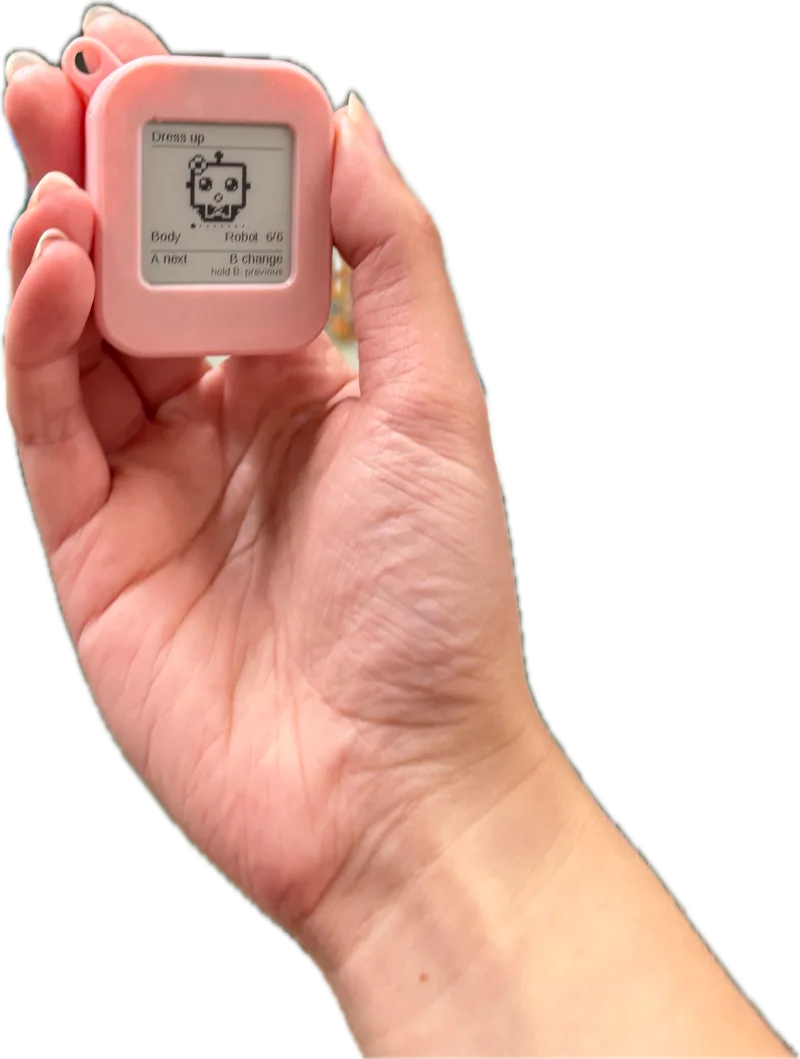
A little creature built from five layers: a body (blob, cat, bear, bunny, frog or robot), eyes, a mouth, a hat and an extra. Dress it up and name it on the device, or design it on the Tools page and send it over USB. A says hi, and it blinks for a minute after your last press. It knows your name, talks about your day (your next class, late reminders, free time), sleeps from 22:00 to 07:00 and wears seasonal outfits.
Hold B on the Pet to open Meet, and it meets the Pet on a friend's unidex:
- Open Meet on both, bring them close (within about 15 cm) and press B.
- The two screens become one room. The Pets say hi, visit each other's screen, chat and swap places, by themselves or when you press A and B. Pull them apart and each walks home.
- The first time, both are asked "Be friends?". Two yeses and they're friends on both devices.
- Friends can send each other a badge. It shows up full screen first: B keeps it, A says no thanks.
- Friends can wave, hug, shake hands in secret and have sleepovers, and play High five, Catch and Tug of war.
- No WiFi or internet: they talk straight to each other over the radio, only while Meet is open.
Name Badge
Full-screen black-and-white images: name tags, logos, photos. A shows the next one, hold B the previous one, and B opens a picker with thumbnails. The last one shown stays on screen even with the battery out.
Make them with the badge maker on the Tools page. Drop in any image, adjust it, and send it straight to the device over USB. Nothing is uploaded to the internet.
Badge plugins add badges that are drawn by code each time they're shown, like Today, which always shows the date.
Games
Four one-button games: Flappy, Dino, Stack and Jetpack. B is the only action, a tap or a hold, and the best score for each is kept on the device. Games from the store play here too, with scores and a game-over screen, and so do the store's other games, like Dex, Dice and Coin & RPS.
Apps & plugins
On top of the built-in apps, unidex runs apps and plugins that anyone can write. An app is a folder with two small Lua files you can write in any text editor, and there's nothing to compile. It can draw anything on the screen, use both buttons like the built-in apps, keep its own files and read the time and battery. If it asks for permission, it can fetch things from the web too.
- The store has over 20 so far, all free: Weather, Habits, Flash cards, Focus, Climate (temperature and humidity), Countdown, Dice and more.
- Apps live on the SD card and open from Home > Apps. Hold B on one to offload it (its data stays) or delete it.
- Each one runs in a sandbox with its own memory, its own folder and a time limit, and can't reach your WiFi password, keys, notes or other apps' files. If one breaks, the device says "App error" and goes back to the list.
- The Apps page shows what's on your unidex, and installs, updates and removes apps over USB.
- Anyone can send an app to the store. It gets tried in an emulator, then read by a person before it's listed.
- You can try an app in the browser emulator without a device.
- Plugins add to the built-in apps instead. For now that's Badge: a badge drawn by code each time it's shown, like Today, which always shows the date.
Dex
Not built in: a free app from the store.
A WiFi network collection game. Press B to scan for about two seconds and you get "NEW!" with the best new find, or "nothing new".
- Each network name is logged once, with a rarity: starter, common, uncommon or rare.
- A shows everything found, newest first. Hold B for the counts per rarity.
- It only listens and never connects to anything. Access point addresses are never stored, only a salted hash.
Chooser
Not built in: a free app from the store.
Pick two to nine squares and press B. The highlight walks the grid, slows down and lands on a winner, picked up front by the chip's hardware random number generator. It keeps a tally of wins.
Settings
- Set the date and time by hand, if you have no WiFi or Mac.
- How long it stays awake: 10, 20, 30 or 60 seconds.
- Sync: sets the clock from the internet and fetches this week's events from a private calendar link (Google, Outlook or iCloud).
- Battery saver: sleeps after 5 seconds at most, the Pet stops blinking, the Clock counts every 10 seconds and WiFi runs slower. The phone portal stops sooner.
- Volume, for notes and chimes: 0 (off) to 10, with a chime at each step. Alert sound off keeps reminders on screen without the chime.
- Ringtone: Chime, Bell, Rise, Beeps or Ripple.
- Note language: Auto, or one of 16.
- Hold B in Settings to set up from your phone: the device makes its own WiFi and shows a QR code. You can read notes, change settings, add WiFi and keys, make badges and Pets, and install apps. Nothing goes over the internet.
- Invert: white on black everywhere.
- Battery voltage, firmware version, storage used and the device's name (you can rename it).
- Reset data: calendar events, the Pet's friends, or all of them. Each one asks first.
- Factory reset, for passing it on: it wipes the WiFi, keys, the Pet and every setting, and asks twice. Files on the SD card stay.
Power & battery
- It deep-sleeps after 10 seconds without a press and wakes on either button.
- The clock keeps time through sleep and power-off.
- On USB it stays awake, so syncing and updating always find it. If a plain charger keeps it awake past its sleep time, it naps in short steps. It can't tell a finished wall charger from a battery, so it may sleep while plugged in.
- The battery % climbs slowly to 100 while charging and survives a restart.
- Charges over USB-C. A small bolt on the home screen shows USB power.
- When the battery is low, WiFi, Meet and recording wait ("Battery too low"). When it's flat, it shows "Charge me" and switches off.
- If it ever freezes, it restarts by itself after 30 seconds.
Battery life depends on how often you press things. It draws very little while asleep.
Setup
unidex arrives with the firmware installed. You can set the rest up from your phone: in Settings, hold B and scan the QR code, and a page opens with your notes, settings, WiFi and keys, the badge maker, the Pet designer and the app store. Nothing goes over the internet.
Or use Chrome or Edge on a computer, over a USB-C cable, with nothing to install. Updating the firmware needs the computer:
The Installer gets you the latest firmware. Updating keeps your badges, apps, events and settings. Tools has Sync everything (firmware, clock, calendar and notes in one click), the badge maker, the Pet designer, a way to set the clock, and the Mac calendar sync.
Setup is where you add WiFi, API keys and GitHub, each with a Test button that runs on the device. Apps is where you install, update, offload and delete apps.
Specs
| Screen | 1.54" black and white e-paper, 200 × 200 |
| Chip | ESP32-S3, 8 MB flash, 8 MB PSRAM |
| Wireless | 2.4 GHz WiFi, off unless in use; a direct radio link for Pet Meet |
| Storage | Micro SD card (FAT32) |
| Inputs | Two buttons, microphone |
| Sensor | Temperature and humidity (reads a little warm: it sits next to the chip) |
| Speaker | Fitted in its own slot. Plays your notes, reminders, alarms and the timer. |
| Clock | Battery-backed real-time clock |
| Power | Rechargeable LiPo, USB-C |
| Case | 3D printed, held together by four small M2 screws, keychain loop |
| Size | 45.4 × 54.7 × 17.5 mm (49.5 × 58.8 mm with the loop) |
| Board | Waveshare ESP32-S3-ePaper-1.54 V2 |
The code
Everything I wrote for unidex is on GitHub: the firmware, the browser installer and setup tools, the emulator and the Mac calendar helper. You can read how it works, build it yourself or write your own app. It's free to use, fork and improve for non-commercial use (PolyForm Noncommercial 1.0.0); selling it needs written permission.
It was featured on XDA. If you'd like to support it, there's a Ko-fi.
FAQ
- How long does the battery last?
- It depends how much you use it. It sleeps a few seconds after every press, and WiFi only comes on when something needs it, so a light day of glancing at it uses very little. Battery saver stretches it further. It charges over USB-C.
- What's the SD card for?
- Your badges, voice notes, timetable and apps live on it. Yours comes set up with the starter badges and an empty timetable, so it works straight away.
- Do I have to use AI?
- No. Only the voice features (notes, reminders and the clock by voice) and the agent use it, and only if you add your own keys. Everything else works without AI or the internet. You can also switch the tidy-up off and just keep the plain transcript.
- What about my privacy?
- There's no account, no tracking and no analytics on the device. Your keys stay on it. A voice note only goes to the services you pick, and only when you record one.
- Do I need a computer?
- Not day to day. You can set it up from your phone. Updating the firmware needs Chrome or Edge on a computer.
- When will it arrive?
- I'm aiming to post them before Christmas, UK only. You pick the delivery at checkout: Evri tracked £3.50 or Royal Mail Tracked 24 £5. I'll email you tracking when yours goes out, and if the date changes.
- Can I cancel?
- Yes, for a full refund any time before it's posted, and within 14 days after it arrives.
Something else? Email shadiforrest@gmail.com. The full terms are on the terms & privacy page.
Pre-orders
80 in this batch.
I'm aiming to post before Christmas.
£29.99 + postage from £3.50. Comes with a set-up SD card.
- 80 only.
- Pick your colour at checkout: white, pink, purple, green or blue.
- Postage: Evri tracked £3.50 or Royal Mail Tracked 24 £5, you choose at checkout. UK only.
- I'm aiming to post before Christmas.
- Free cancellation before it's posted.
- Or cancel within 14 days of delivery.